My Agent Server Was Running Out of Disk. The Cause Was Boring.
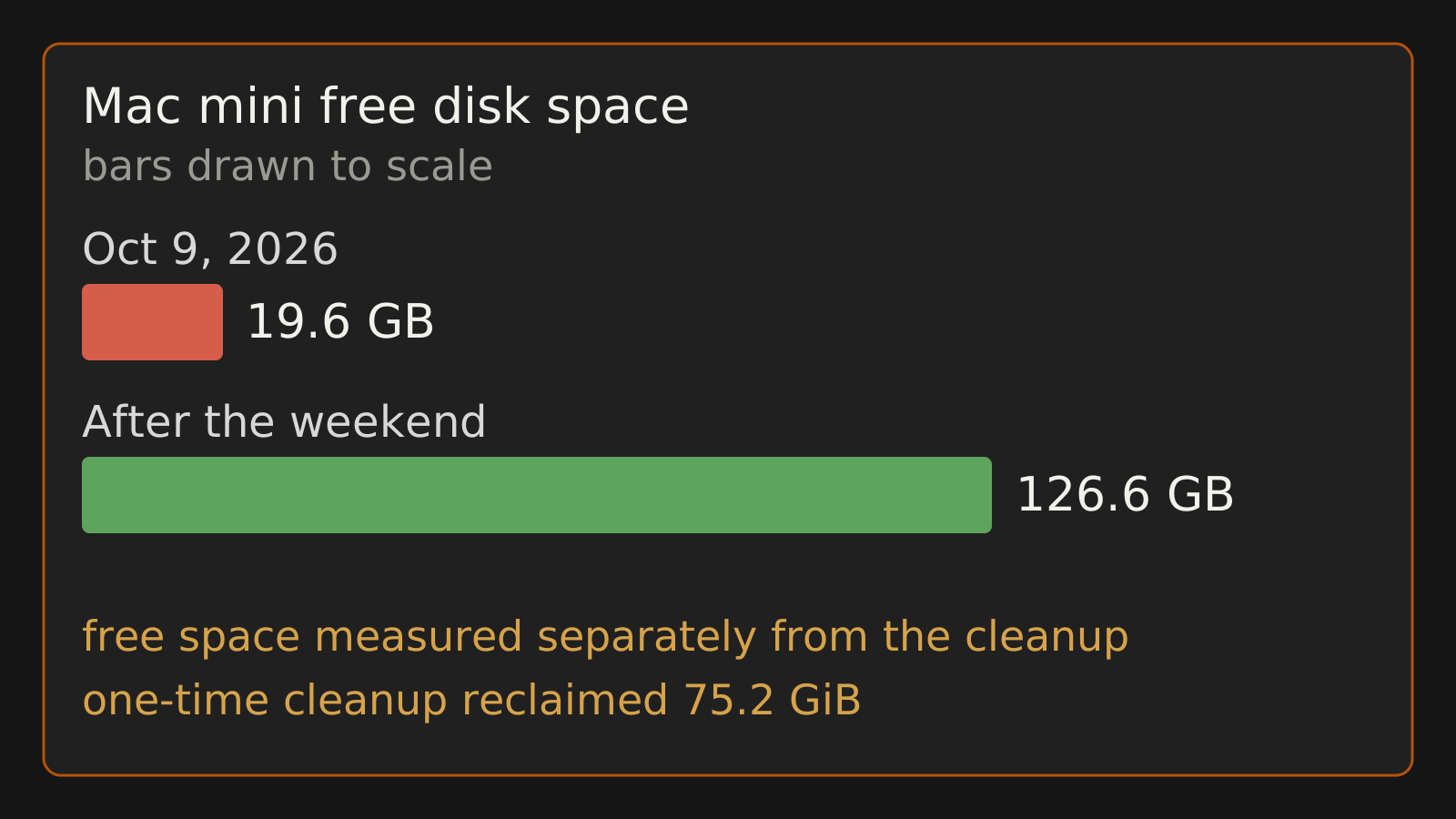
Free space was measured separately from the cleanup. The one-time verify-before-delete cleanup reclaimed 75.2 GiB. 174 of 174 rollbacks used only their own deploy’s backup, whose unique content was about 1.1 MB.
My Mac mini is where the agents live: scheduled jobs, the Board, release runs. On October 9 it had 19.6 GB free. That isn’t empty, but it was below the room a deploy needs.
I expected a runaway log or some cache gone wrong. It was copies.
Gigabytes to protect a megabyte
Most of the runtimes, caches, rollback backups and task workspaces were full copies of my marketing repo. That repo is about 2.1 GB on disk. The code in it is about 20 MB. About 1 GB of it was MP3 briefings.
Old copies were supposed to get cleaned up. The cleanup had bugs, so for several kinds of copy it mostly didn’t happen.
The rollback backups were the clearest waste. So I checked how they had actually been used: 174 of 174 rollbacks only ever used their own deploy’s backup. The content in those backups that Git couldn’t rebuild was about 1.1 MB.
I was keeping gigabytes to protect about a megabyte.
Why I said no to the SSD
The easy suggestion was to move everything to the external SSD. I rejected it. That only relocates the growth. The SSD fills up later and I spend another weekend on the same problem, on a bigger disk.
The fix had to make the copies small and stop them from living forever:
- Runtimes ship about half the bytes they used to.
- Backups store only the files Git can’t rebuild: a manifest plus a few MB. I call that format git-overlay.
- Each group keeps one backup generation.
- A one-time cleanup archived anything that wasn’t in Git first, then deleted only copies it had verified Git could rebuild. It reclaimed 75.2 GiB.
I rolled this out group by group over the weekend, not all at once.
Free space went from 19.6 GB on October 9 to 126.6 GB after. I measured that separately from the cleanup, and other housekeeping happened the same weekend, so I don’t read the difference as one fix’s result. By my own count, the external SSD went from about 860 GiB used to 590 GiB.
The second leak
The SSD was hiding its own version of the problem. Kept working copies weren’t being reaped: about 2,300 cached workspaces. The reaper existed, but three bugs stopped it. Tests had also been cloning the real repo into the live cache, so running the test suite added to the pile.
With those fixed, a 7-day reaper drains them: 2,312 on October 10, 1,164 by October 11.
I also took 1,405 media files (~1.6 GB) out of Git tracking, and added a test that fails if they’re tracked again. A rule I have to remember will get broken by the next agent in a hurry. A failing test won’t.
None of this was clever. The code that deletes things was missing or broken in a few places, and nobody noticed until the disk got tight.
The sync job that failed quietly
Same weekend, different problem. An hourly job keeps the Mini’s copies of my repos current with GitHub. The Mini’s main copy of the marketing repo sat 195 commits behind for two days.
The cause was one untracked file, a snapshot written by an automated error-ops job. It blocked the hourly fast-forward. The only alert was a dashboard card nobody saw. Nobody means me.
While fixing that, I found a worse one. A run that got killed left its lock file behind, and every later sync saw the lock and quietly stopped. Now an untracked file no longer blocks a sync by itself, though Git still refuses an update that would overwrite one. The lock is flock, which is released when the process dies.
”So I ping you to fix, that’s dumb”
Even fixed, the job still ended with a human. If the sync breaks, I get told, and then I ask an agent to fix it. That’s a manual retry loop with me in the middle. My words in the session:
“It should be proactive and fix things, not simply alert me. So I ping you to fix, that’s dumb.”
Self-repair has a real failure mode, though, and I had already hit it. In July, by my own account of that incident, an earlier version “fixed” blocked copies by committing work-in-progress to main. It left a copy 108 commits behind on a scratch branch for two days. The repair caused the exact problem it was supposed to solve.
So the rule became: save first, and refuse when unsure.
The new self-heal is deployed, but so far it has only run in tests. No repo has needed it live yet. Here’s what it is built to do. After 6 quiet hours with no live agent session in that checkout, the sync job:
- Commits the checkout’s local changes to a rescue branch on GitHub.
- Verifies the push.
- Re-checks that nothing changed.
- Catches up.
Some cases are refused outright: anything that looks like a secret, a half-done rebase or merge, a detached checkout, the wrong branch, submodules, and untracked files over 50 MB. Those, and any copy still blocked, get a Telegram alert once a day after 24 hours blocked. Separately, a watchdog restarts a dead sync job twice before it alerts. What’s left for me is mostly the cases where a decision is actually mine.
Letting someone try to break it
Before shipping it, I had an independent reviewer try to break the self-heal. It took three rounds. From my notes on those rounds:
- Round one found 8 holes. Two of them could lose unpushed commits.
- Round two found a race: an edit landing while the job was downloading from GitHub.
- Round three found that binary files crashed the secret scan.
Each one was fixed with a test. Anything that rewrites Git state on its own gets reviewed by someone trying to break it. Round one is why.
What I don’t know yet
The self-heal has only run in tests. I’ll trust it more the first time it rescues a real copy and everything is on the rescue branch where it should be. Until then it’s a well-tested guess, and I’m okay with that.
What I’d copy
- Before you buy more room, count the copies.
- Anything your automation creates needs working code that deletes it.
- If an alert always ends with you asking an agent to fix it, and the fix is safe, the alert should be the fix.
- Self-repair saves first, verifies, and refuses when it isn’t sure.
The disk getting tight was the boring part. The useful part was noticing how many of my “alerts” were just me relaying a problem back to a machine that could have handled it.